MQTT API exposed by the SmartVOX Gateway to upload device data and control the SmartVOX radio network remotely.
Overview
This API documents the SmartVOX Gateway application running on a Teltonika RUT976 router. The gateway bridges a SmartVOX LoRa mesh network to an MQTT backend.
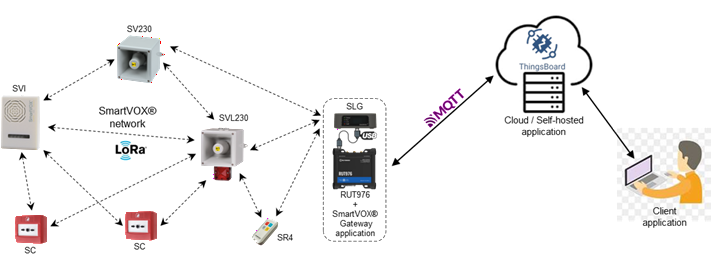
Typical deployment
- SmartVOX devices (SV/SVI/SR/SB/SC/SGM families) communicate over SmartVOX LoRa mesh.
- SGM (LoRa <-> USB modem) is connected to the RUT976 through USB.
- RUT976 hosts the SmartVOX Gateway app and provides network uplink (Ethernet / Wi-Fi / 5G).
Capabilities
The gateway interacts with the MQTT backend in two ways:
- Publish gateway and SmartVOX network device states to the MQTT backend.
- Receive server-side RPC requests from the backend (trigger alerts, refresh states).
- Publish client-side RPC requests to the backend when alerts originate from the radio network.
Product references
Product range: SmartVOX product range
Devices summary
| Family | Visual | Main role in SmartVOX Gateway | References | Specific notes |
|---|---|---|---|---|
| SV SV230 / SV012 |
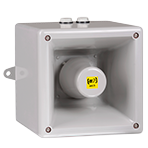 |
Voice sounders (with/without beacon) used to broadcast synchronized alarms and voice instructions. |
Radio Voice Sounder with Beacon Radio Voice Sounder |
Outdoor/industrial deployment. |
| SVI | 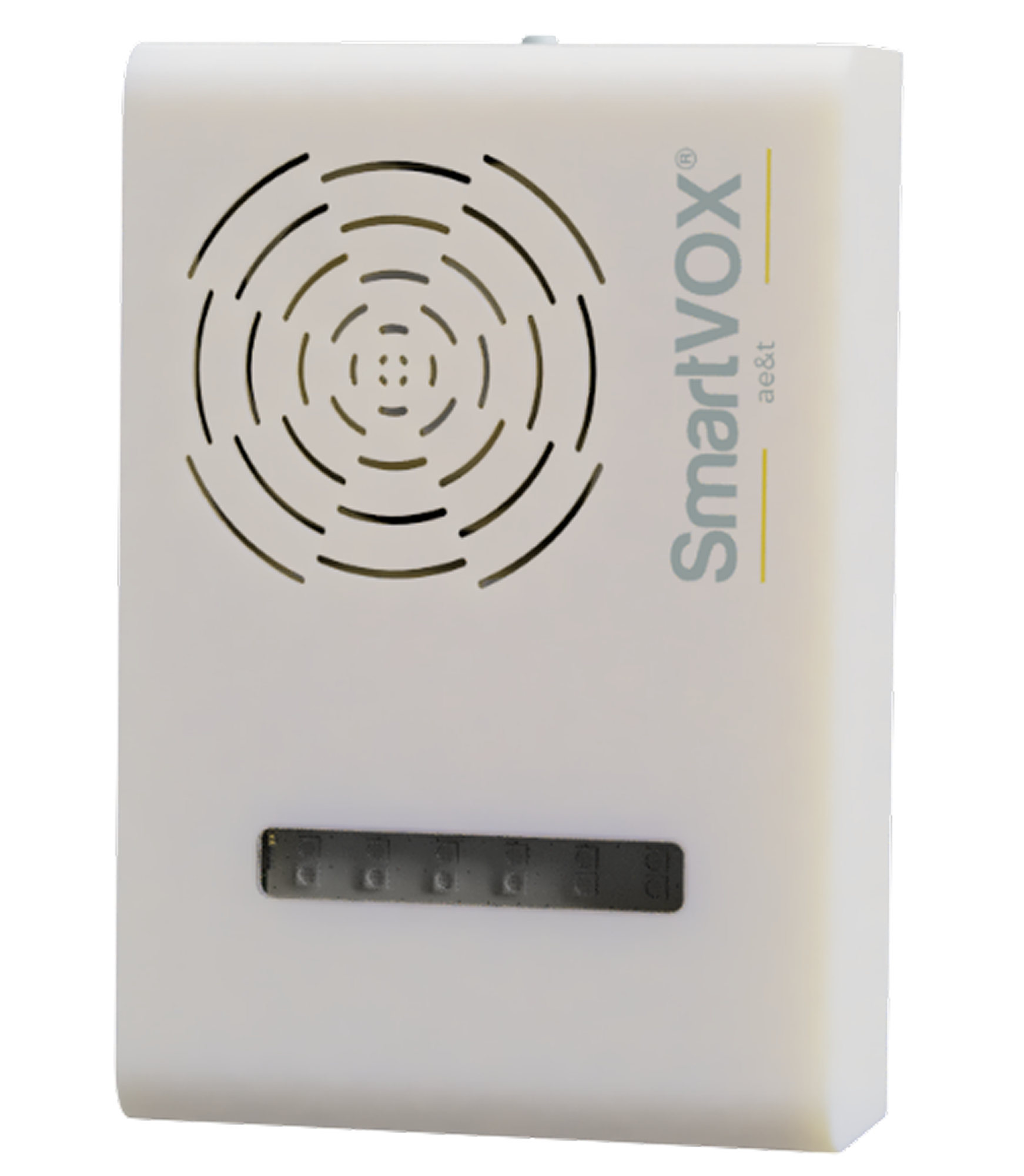 |
Indoor voice siren with flash for evacuation/lockdown instructions in public facilities. | Wireless Voice Siren with Flash | Indoor-focused form factor. |
| SR SR1 / SR4 |
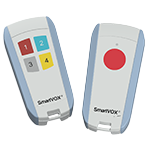 |
Portable operator remotes to trigger predefined alert scenarios. |
1-Button Radio Remote Control 4-Button Radio Remote Control |
Portable operator-trigger device family. |
| SC SC / SCW |
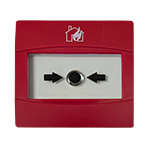 |
Manual call points (standard/waterproof) for immediate local emergency triggering. |
Radio Manual Call Point Waterproof Radio Manual Call Point |
Standard and waterproof variants. |
| SB SB6 |
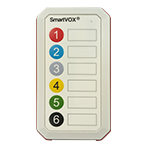 |
Fixed multi-button control box for supervised scenario triggering. | 6-Button Radio Remote Control Box | Typically installed in control rooms/security posts. |
| SGM | 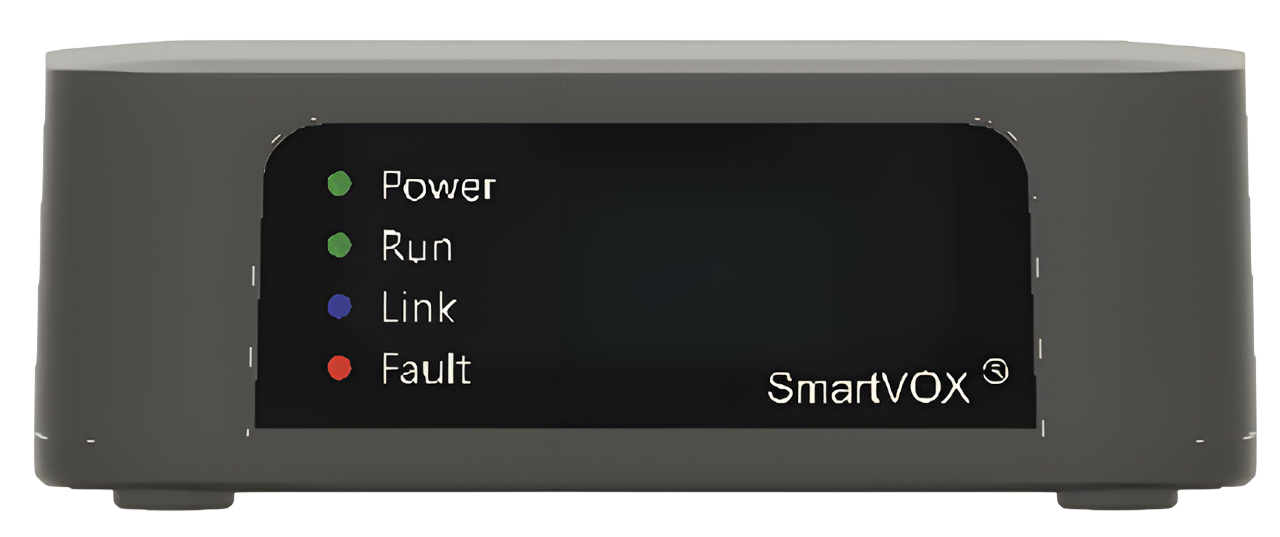 |
LoRa-to-USB modem bridging SmartVOX mesh traffic with the gateway app; also relays mesh traffic. | No public page yet | Front LEDs: Power (device powered), Run (blinking when active), Link (off: MQTT uplink disabled, blinking: connecting, steady: connected), Fault (SGM or RUT976 fault). |
| RUT976 | 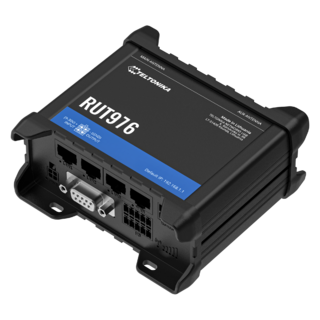 |
Industrial router running SmartVOX Gateway app and providing secure IP uplink to the MQTT backend. |
RUT976 Wiki RUT976 Product Page |
Can use Ethernet, Wi-Fi, or 5G uplink to reach the MQTT backend. |
Compatible MQTT backends
Topic layout and payload conventions follow ThingsBoard MQTT Device/Gateway APIs, enabling plug-and-play integration with ThingsBoard:
The same topics and payloads work with any standard MQTT broker that routes them, including:
With a generic broker, your backend application must handle both sides of the MQTT exchange: subscribe to gateway publications, publish server-side RPC commands, and map payloads to your own data model. Use TLS (8883 or 443) in production deployments.
Last Will and Testament (LWT)
On unexpected disconnect, the gateway publishes {"connectionState":"offline"} on v1/devices/me/telemetry. This is intentionally lighter than regular telemetry (which also requires ts and radioModem) and is sufficient for backends to detect gateway offline state.
Topic directions (gateway perspective)
| Direction | Topic | Backend action |
|---|---|---|
| Gateway → backend | v1/devices/me/attributes, v1/devices/me/telemetry |
Subscribe |
| Gateway → backend | v1/gateway/connect, v1/gateway/disconnect, v1/gateway/attributes, v1/gateway/telemetry |
Subscribe |
| Gateway → backend | v1/devices/me/rpc/request/$request_id (client-side RPC) |
Subscribe |
| Gateway → backend | v1/devices/me/rpc/response/$request_id |
Subscribe (optional, for RPC tracing) |
| Backend → gateway | v1/devices/me/rpc/request/$request_id (server-side RPC) |
Publish |
MQTT data model
Regardless of the chosen broker, the gateway exposes the same topics and payloads, organized into 3 functional groups:
Gateway states
Data about the gateway itself (SmartVOX app + attached SGM modem).
Attributes
Identity / configuration
SEND gatewayDeviceAttributes{ "ts": <ms>, "appVersion": "<version>", "radioModem": { ... } | null }
radioModem: SGM modem metadata (id, type, name, groups, channel, panId, encryptionKey, fwVersion) or null when unavailable.
Telemetry
Runtime state
SEND gatewayDeviceTelemetry{ "ts": <ms>, "connectionState": "online"|"offline", "radioModem": { "isOperational": true|false } }
Network device states
Data about SmartVOX devices present on the LoRa mesh network (SV/SVI/SR/SC/SB/SGM).
Glossary: attributes = static or slow-changing metadata; telemetry = runtime state sampled over time; faults = abnormal conditions; status = live operational indicators.
Connect
Device presence notification
SEND networkDeviceConnect{ "device": "<id>", "type": "<deviceType>" }
The gateway publishes
connectbefore attributes/telemetry whenever it (re)publishes a network device state (including device updates andrefreshDevices). On ThingsBoard, the Device Profile is assigned only at device creation from the connecttypefield. Attributes/telemetry alone after a manual delete recreate the device with profiledefault; a prior connect-with-type recreates (or binds) it with the correct SmartVOX profile. Re-sending connect is idempotent if the device already exists with that profile.
Disconnect
Device presence removal
SEND networkDeviceDisconnect{ "device": "<id>" }
Attributes
Batched static metadata, keyed by radio device ID
SEND networkDevicesAttributes{ "<deviceId>": { "ts", "type", "name", "groups", ... }, ... }
Common fields
Present on every device entry
ts: attribute timestamp (milliseconds).type: device type (SV230,SV012,SVI,SR,SC,SB,SGM).name: device name (up to 15 chars, no spaces).groups: group membership (group IDs0..15).
Device-specific fields
Additional attribute keys per device family
| Device type | Fields |
|---|---|
| SR | keypadVersion — detected keypad (not-connected, 1-button, 4-buttons, unknown). |
| SV230 / SV012 / SVI | psuBackupDisabled — backup battery takeover disabled by configuration. |
| SC / SB | No extra field beyond common attributes. |
| SGM | psuMonitoringEnabled — power module supervision enabled and reported upstream. |
Telemetry
Batched runtime state, keyed by radio device ID
SEND networkDevicesTelemetry{ "<deviceId>": [ { "ts": <ms>, "values": { ... } }, ... ], ... }
Common fields
Inside each values object, all device types
connectionState:online,offline, orpending.keepAlive:intervalSec: expected keepalive period.elapsedSinceLastRxSec: elapsed time since last radio frame.timeUntilNextRxSec: expected remaining time until next keepalive.
network(radio quality/path metrics):hopCount: number of radio hops.nearbySrc/nearbyLqi: nearest relay/source and its LQI.worstSrc/worstLqi: weakest observed path and its LQI.
faultsandstatus: device-type specific (see below).
Important behavior
When connectionState is offline or pending, network, faults and status are explicitly null.
Device-specific faults
All types also expose common systemFault
| Device type | Fault flags |
|---|---|
| SR | batteryFault, keypadFault |
| SV230 / SV012 / SVI | psuMainsFault, psuBackupFault |
| SC | battery1Fault, battery2Fault, tamperActive |
| SB | battery1Fault, battery2Fault |
| SGM | hostCommLost, psuCommLost, psuMainsFault, psuBatteryFault, psuInternalFault, uplinkFault |
Device-specific status
| Device type | Status fields |
|---|---|
| SR | batteryLevel (raw scale 0..255) |
| SV230 / SV012 / SVI | None — health is mainly represented through faults and connection state. |
| SC | buttonActive, battery1Level, battery2Level (raw scale 0..255) |
| SB | keylockActive, battery1Level, battery2Level (raw scale 0..255) |
| SGM | uplinkConnected |
RPC requests
Bidirectional command flow between the backend and the SmartVOX Gateway.
$request_id(topic parameter)
- Format: unsigned decimal integer (
uint32), range0..4294967295.- Examples:
v1/devices/me/rpc/request/42,.../request/2847193847.- Invalid values (empty, non-decimal, >
uint32): request is ignored; no RPC response.- Uniqueness (server-side): must be unique among recent RPCs. The gateway silently drops duplicates for 60 seconds (no response). Prefer a random
uint32or a strictly increasing counter that does not reuse values within that window.- Correlation: gateway replies on
v1/devices/me/rpc/response/$request_idwith the same id (server-side RPC only).
Server-side RPC (backend -> gateway -> backend)
Backend sends commands; gateway executes and replies on the response topic.
Request
Backend publishes, gateway consumes
RECEIVE serverSideRpcRequest{ "method": "<name>", "params": { ... } }
The four alert methods below share the same params contract for both server-side and client-side RPC (see client-side RPC).
| Method | Description (server-side) | params |
|---|---|---|
trigAlertOnce |
Trigger one alert cycle. |
See Alert Request Specifications for the params contract (fields, constraints, examples).
|
trigAlertContinuous |
Start a continuous alert (requires alertId). |
|
stopAlertAll |
Stop all active alerts in the given scope. | |
stopAlertContinuous |
Stop one continuous alert identified by alertId. |
|
refreshDevices |
Force an immediate re-publish of gateway and SmartVOX network device states (attributes, telemetry, presence). Server-side RPC only. | Empty object: {} |
Response
Gateway publishes, backend subscribes
SEND serverSideRpcResponseClient-side RPC (gateway -> backend)
Gateway publishes alert commands when they originate from the radio network. No response is expected from the backend.
Request
Gateway publishes, backend subscribes on v1/devices/me/rpc/request/+
{ "method": "<name>", "params": { ... } }
Same four alert methods as server-side RPC
(trigAlertOnce, trigAlertContinuous, stopAlertAll, stopAlertContinuous),
with the same params contract.
See Alert Request Specifications.
Servers
- mqtt://{host}:{port}/mqttmqttBroker
MQTT broker endpoint. Compatible with Mosquitto, EMQX, HiveMQ, AWS IoT Core MQTT, and ThingsBoard. ThingsBoard is plug-and-play (device access token as username). AWS IoT Core typically uses TLS on port 8883 with X.509 client certificates.
objectstringrequiredBroker hostname (e.g. thingsboard.cloud, broker.example.com, xxxxx.iot.region.amazonaws.com).
stringrequiredBroker port (use 8883 or 443 with TLS in production; AWS IoT Core uses 8883).
Security:
- User/Password
Device access token used as MQTT username (ThingsBoard convention; password is empty unless the broker policy requires otherwise). With other brokers, use the credential scheme configured for your deployment (username/password, client certificate, etc.).
object
Operations
SEND v1/devices/me/attributes
Gateway static/identity attributes published to the backend (app version, modem identity and configuration).
Publishes gateway identity/configuration attributes. Typical usage: at startup, after configuration changes, and whenever SGM modem identity/config changes.
Operation IDgatewayDeviceAttributesAvailable only on servers:
objectAccepts the following message:
Message IDmessageGateway identity/configuration payload. Includes SmartVOX Gateway app version and SGM modem metadata (when available).
object [Gateway Attributes (MQTT v1/devices/me/attributes)]Payload published by the SmartVOX Gateway on
v1/devices/me/attributes.Examples
#1 Example
{
  "ts": 1730000000123,
  "appVersion": "v1.3.0",
  "radioModem": {
    "id": "1AB5",
    "type": "SGM",
    "name": "GW_OFFICE",
    "groups": [
      0,
      2
    ],
    "channel": 0,
    "panId": "8888",
    "encryptionKey": "",
    "fwVersion": "v1.3.0"
  }
}
#2 Example
{
  "ts": 1730000000123,
  "appVersion": "v1.3.0",
  "radioModem": null
}
SEND v1/devices/me/telemetry
Gateway runtime telemetry published to the backend (online/offline state and modem operational state). Last Will messages on this topic carry only
connectionState: offline(notsorradioModem).Publishes gateway health/operational telemetry. Typical usage: periodic heartbeat and state transitions (online/offline, modem operational status). On unexpected MQTT disconnect, the Last Will publishes
{"connectionState":"offline"}only (minimal LWT payload).Operation IDgatewayDeviceTelemetryAvailable only on servers:
objectAccepts the following message:
Message IDmessageGateway runtime telemetry payload. Exposes connectivity state and radio modem operational status for monitoring dashboards/alarms.
object [Gateway Telemetry (MQTT v1/devices/me/telemetry)]Examples
#1 Example
{
  "ts": 1730000000999,
  "connectionState": "online",
  "radioModem": {
    "isOperational": true
  }
}
#2 Example
{
  "ts": 1730000000999,
  "connectionState": "offline",
  "radioModem": {
    "isOperational": false
  }
}
SEND v1/gateway/connect
Notification that a SmartVOX radio device is now visible/connected through the gateway. Published before attributes/telemetry so ThingsBoard can assign the Device Profile from
type.Announces that a SmartVOX radio device is connected/seen on the mesh network through this gateway. Helps the backend keep device presence up to date.
Publishing order: the gateway sends
connectbefore attributes/telemetry when (re)publishing a network device (including updates andrefreshDevices). On ThingsBoard, Device Profile is assigned only at creation from the connecttypefield; attributes/telemetry alone after a manual delete recreate the device as profiledefault. Re-sending connect-with-type is idempotent if the device already exists with the correct SmartVOX profile.Operation IDnetworkDeviceConnectAvailable only on servers:
objectAccepts the following message:
Message IDmessageNotification that a SmartVOX device became reachable on the radio network.
object [Network Connect (MQTT v1/gateway/connect)]Examples
#1 Example
{
  "device": "04AF",
  "type": "SV230"
}
SEND v1/gateway/disconnect
Notification that a SmartVOX radio device is disconnected or no longer reachable.
Announces that a SmartVOX radio device is disconnected or no longer reachable. Helps the backend reflect radio network availability changes.
Operation IDnetworkDeviceDisconnectAvailable only on servers:
objectAccepts the following message:
Message IDmessageNotification that a SmartVOX device became unreachable on the radio network.
object [Network Disconnect (MQTT v1/gateway/disconnect)]Examples
#1 Example
{
  "device": "04AF"
}
SEND v1/gateway/attributes
Batched SmartVOX device attributes for all known devices on the LoRa mesh network.
Publishes batched attributes for SmartVOX devices (type, groups, device-specific capabilities). Payload is keyed by radio device ID.
Operation IDnetworkDevicesAttributesAvailable only on servers:
objectAccepts the following message:
Message IDmessageBatched SmartVOX network device attributes keyed by radio device ID. Each entry describes static/slow-changing metadata used to classify and configure UI behavior.
object [Network Devices Attributes (MQTT v1/gateway/attributes)]Examples
#1 Example - SR attributes example
SR device requires `keypadVersion`.
{
  "10B2": {
    "ts": 1730000000210,
    "type": "SR",
    "name": "SR-10B2",
    "groups": [],
    "keypadVersion": "4-buttons"
  }
}
#2 Example - SV230 attributes example
SV230/SV012/SVI devices require `psuBackupDisabled`.
{
  "04AF": {
    "ts": 1730000000200,
    "type": "SV230",
    "name": "Siren-04AF",
    "groups": [
      0,
      1
    ],
    "psuBackupDisabled": false
  }
}
#3 Example - SGM attributes example
SGM devices require `psuMonitoringEnabled`.
{
  "1AB5": {
    "ts": 1730000000300,
    "type": "SGM",
    "name": "GWLINK-1AB5",
    "groups": [
      2
    ],
    "psuMonitoringEnabled": true
  }
}
#4 Example
{
  "04AF": {
    "ts": 1730000000200,
    "type": "SV230",
    "name": "Siren-04AF",
    "groups": [
      0,
      1
    ],
    "psuBackupDisabled": false
  },
  "10B2": {
    "ts": 1730000000210,
    "type": "SR",
    "name": "SR-10B2",
    "groups": [],
    "keypadVersion": "4-buttons"
  }
}
SEND v1/gateway/telemetry
Batched SmartVOX device telemetry (connectivity, faults, status indicators).
Publishes batched telemetry for SmartVOX devices (connection state, keepalive, network quality, faults, status). Payload is keyed by radio device ID.
Operation IDnetworkDevicesTelemetryAvailable only on servers:
objectAccepts the following message:
Message IDmessageBatched SmartVOX network device telemetry keyed by radio device ID. Each entry provides operational state (connectivity, keepalive, faults, status values).
object [Network Devices Telemetry (MQTT v1/gateway/telemetry)]Examples
#1 Example - SR telemetry example
{
  "04AF": [
    {
      "ts": 1730000000450,
      "values": {
        "connectionState": "online",
        "keepAlive": {
          "intervalSec": 30,
          "elapsedSinceLastRxSec": 5,
          "timeUntilNextRxSec": 25
        },
        "network": {
          "hopCount": 1,
          "nearbySrc": "00A1",
          "nearbyLqi": 210,
          "worstSrc": "00B2",
          "worstLqi": 180
        },
        "faults": {
          "systemFault": false,
          "batteryFault": false,
          "keypadFault": false
        },
        "status": {
          "batteryLevel": 97
        }
      }
    }
  ]
}
#2 Example - SGM telemetry example
{
  "1AB5": [
    {
      "ts": 1730000000460,
      "values": {
        "connectionState": "online",
        "keepAlive": {
          "intervalSec": 30,
          "elapsedSinceLastRxSec": 4,
          "timeUntilNextRxSec": 26
        },
        "network": {
          "hopCount": 1,
          "nearbySrc": "00A1",
          "nearbyLqi": 205,
          "worstSrc": "00C3",
          "worstLqi": 170
        },
        "faults": {
          "systemFault": false,
          "hostCommLost": false,
          "psuCommLost": false,
          "psuMainsFault": false,
          "psuBatteryFault": false,
          "psuInternalFault": false,
          "uplinkFault": false
        },
        "status": {
          "uplinkConnected": true
        }
      }
    }
  ]
}
RECEIVE v1/devices/me/rpc/request/$request_id
RPC request topic used for both server-side RPC (backend -> gateway) and client-side RPC (gateway -> backend).
$request_idis a non-negative decimal integer in0..2147483647(int32max) in the topic suffix. Invalid ids are ignored. Server-side duplicates are dropped for 60 s without response.Receives RPC requests from the backend to execute gateway/network actions. Main use cases:
- alert methods (
trigAlertOnce,trigAlertContinuous,stopAlertAll,stopAlertContinuous) — see Alert Request Specifications, refreshDeviceswith emptyparamsto force re-publication of gateway and network device states.
Topic
$request_idmust be a unique decimal integer in0..2147483647. Duplicates within 60 s are silently ignored (no response). Invalid topic ids are also ignored.Operation IDserverSideRpcRequestAvailable only on servers:
objectAccepts the following message:
Message IDmessageServer-side RPC request consumed by the gateway. Alert
params: Alert Request Specifications.refreshDevicesaccepts an emptyparamsobject and triggers an immediate state re-publish. JSON Schema: rpc-server-side-request.bundled.schema.json.object allOfRPC request consumed by the gateway when the backend initiates server-side RPC.
Examples
#1 Example - refreshDevices
Force gateway and network device state re-publish.
{
  "method": "refreshDevices",
  "params": {}
}
#2 Example
{
  "method": "trigAlertOnce",
  "params": {
    "source": {
      "kind": "device",
      "id": "1A2B"
    },
    "scope": {
      "type": "group",
      "groupId": 0
    },
    "priority": "high",
    "signaling": "combined",
    "audible": {
      "sounds": [
        {
          "bank": "standard",
          "fileId": 0,
          "attenuationInDB": 0,
          "repeats": 1
        }
      ],
      "sequenceRepeats": 1
    }
  }
}
- alert methods (
SEND v1/devices/me/rpc/response/$request_id
RPC response topic for gateway responses to server-side RPC requests. Uses the same
$request_id(decimal,0..2147483647) as the matching request topic. Subscribe withv1/devices/me/rpc/response/+to receive all responses.Returns execution result for a server-side RPC request. Response includes result code and an optional message for troubleshooting. Published on
v1/devices/me/rpc/response/$request_idwith the same id as the request (0..2147483647).Operation IDserverSideRpcResponseAvailable only on servers:
objectAccepts the following message:
Message IDmessageServer-side RPC execution response.
resultindicates whether the action succeeded, andmsgprovides contextual details on errors. JSON Schema: rpc-server-side-response.schema.json.object [RPC Server-side Response (MQTT v1/devices/me/rpc/response/+)]RPC response published by the gateway to answer server-side RPC requests from the backend.
Examples
#1 Example
{
  "result": "success",
  "msg": ""
}
#2 Example
{
  "result": "invalidParams",
  "msg": "missing key: scope"
}
SEND v1/devices/me/rpc/request/$request_id
RPC request topic used for both server-side RPC (backend -> gateway) and client-side RPC (gateway -> backend).
$request_idis a non-negative decimal integer in0..2147483647(int32max) in the topic suffix. Invalid ids are ignored. Server-side duplicates are dropped for 60 s without response.Publishes client-side RPC requests from the gateway to the backend when an alert event originates from the radio network. This is used for alert method propagation and traceability on the backend. The gateway assigns a random
$request_idin0..2147483647in the topic; no backend response is expected.Operation IDclientSideRpcRequestAvailable only on servers:
objectAccepts the following message:
Message IDclientMessageClient-side RPC request published by the gateway to the backend (alert methods only). Used when a radio-originated alert must be propagated and traced on the backend. Alert
params: Alert Request Specifications (same contract as server-side alert RPC). JSON Schema: rpc-client-side-request.bundled.schema.json.object allOfRPC request emitted by the gateway to the backend (client-side RPC). Only alert-related methods are allowed.
Examples
#1 Example
{
  "method": "trigAlertOnce",
  "params": {
    "source": {
      "kind": "device",
      "id": "1A2B"
    },
    "scope": {
      "type": "group",
      "groupId": 0
    },
    "priority": "high",
    "signaling": "combined",
    "audible": {
      "sounds": [
        {
          "bank": "standard",
          "fileId": 0,
          "attenuationInDB": 0,
          "repeats": 1
        }
      ],
      "sequenceRepeats": 1
    }
  }
}
#2 Example
{
  "method": "stopAlertAll",
  "params": {
    "source": {
      "kind": "device",
      "id": "1A2B"
    },
    "scope": {
      "type": "global"
    },
    "signaling": "combined"
  }
}
Messages
- #1Message IDGatewayAttributesMessage
Gateway identity/configuration payload. Includes SmartVOX Gateway app version and SGM modem metadata (when available).
object [Gateway Attributes (MQTT v1/devices/me/attributes)]Payload published by the SmartVOX Gateway on
v1/devices/me/attributes. - #2Message IDGatewayTelemetryMessage
Gateway runtime telemetry payload. Exposes connectivity state and radio modem operational status for monitoring dashboards/alarms.
object [Gateway Telemetry (MQTT v1/devices/me/telemetry)] - #3Message IDNetworkConnectMessage
Notification that a SmartVOX device became reachable on the radio network.
object [Network Connect (MQTT v1/gateway/connect)] - #4Message IDNetworkDisconnectMessage
Notification that a SmartVOX device became unreachable on the radio network.
object [Network Disconnect (MQTT v1/gateway/disconnect)] - #5Message IDNetworkAttributesBatchMessage
Batched SmartVOX network device attributes keyed by radio device ID. Each entry describes static/slow-changing metadata used to classify and configure UI behavior.
object [Network Devices Attributes (MQTT v1/gateway/attributes)] - #6Message IDNetworkTelemetryBatchMessage
Batched SmartVOX network device telemetry keyed by radio device ID. Each entry provides operational state (connectivity, keepalive, faults, status values).
object [Network Devices Telemetry (MQTT v1/gateway/telemetry)] - #7Message IDRpcRequestMessage
Server-side RPC request consumed by the gateway. Alert
params: Alert Request Specifications.refreshDevicesaccepts an emptyparamsobject and triggers an immediate state re-publish. JSON Schema: rpc-server-side-request.bundled.schema.json.object allOfRPC request consumed by the gateway when the backend initiates server-side RPC.
- #8Message IDRpcClientRequestMessage
Client-side RPC request published by the gateway to the backend (alert methods only). Used when a radio-originated alert must be propagated and traced on the backend. Alert
params: Alert Request Specifications (same contract as server-side alert RPC). JSON Schema: rpc-client-side-request.bundled.schema.json.object allOfRPC request emitted by the gateway to the backend (client-side RPC). Only alert-related methods are allowed.
- #9Message IDRpcResponseMessage
Server-side RPC execution response.
resultindicates whether the action succeeded, andmsgprovides contextual details on errors. JSON Schema: rpc-server-side-response.schema.json.object [RPC Server-side Response (MQTT v1/devices/me/rpc/response/+)]RPC response published by the gateway to answer server-side RPC requests from the backend.